Running a fleet?
Owner-operator?
RoadDocZ is the digital DOT binder for your drivers, tractors and trailers. Drivers open DOT Mode and hand over the phone. Your office sees what's expired, what's expiring and what's waiting for review, and gets notified before anything lapses.
Running a fleet?
Owner-operator?
Driver App
The officer asks for the cab card and the driver starts flipping pages. The ELD malfunction sheet isn't in the truck. The annual inspection on the trailer expired last month and nobody noticed. A driver swaps trailers and the registration stays in the old one. Paper doesn't warn you, doesn't follow the equipment, and only exists in one place.
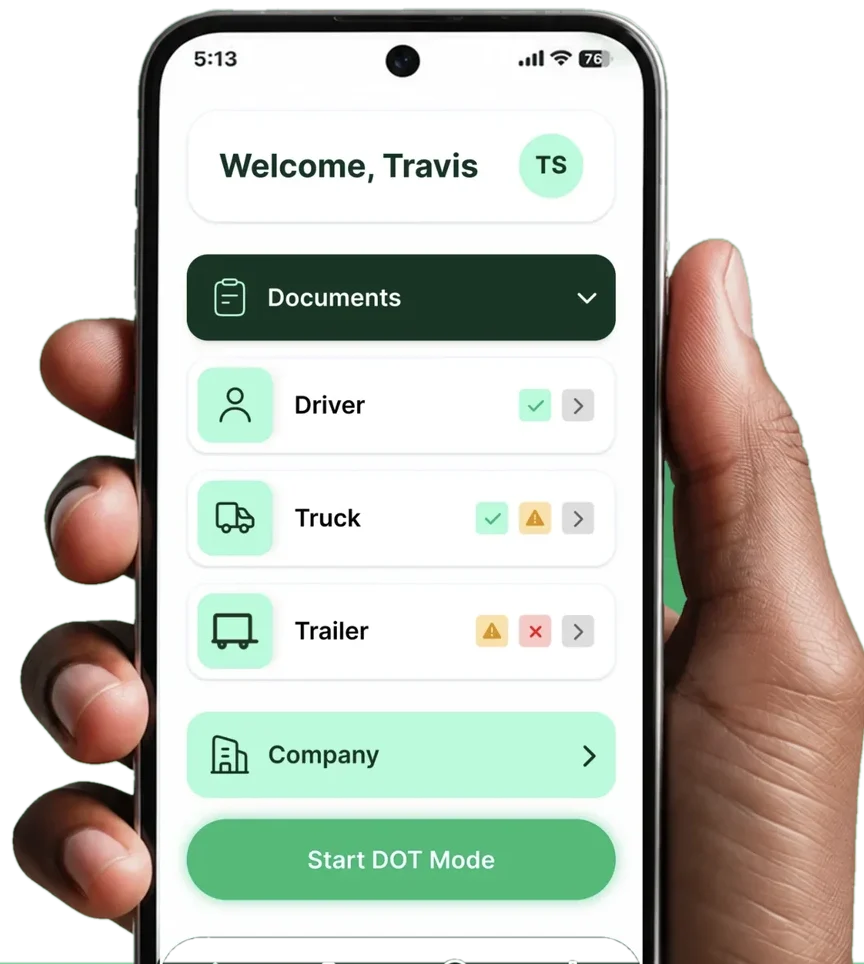
One tap opens an inspection view with only the documents you've marked for inspection: the driver's, the tractor's, the trailer's and the company's.
The home screen shows whether driver, tractor and trailer documents are valid or need attention. The driver screen shows valid, expiring and expired counts and a compliance percentage.
The driver picks the document type, sets the expiry date and scans it with the phone camera or uploads a file.
Your Owner, Dispatcher, Safety, After Hours, ELD Support and Accounting contacts, with Call and Message buttons.
Each driver has an assigned tractor and trailer, and their documents come with the assignment. Co-drivers can share vehicles.
Expired, expiring soon and in-review counts, plus totals for drivers, tractors, trailers and documents, on one screen.
Documents submitted by drivers arrive as In Review. Safety accepts them before they go live. Old versions are archived, not deleted.
Drag and drop or bulk upload PDFs and images. Files are linked to documents, and unused files are easy to find.
Push, email and in-app notifications 30 days before any document expires, for the office and for the driver it belongs to.
Start with the standard set (CDL, Medical, PSP, MC Certificate, IFTA License, ELD manuals, tractor and trailer registrations and DOT inspections) and add your own.
Every change to drivers, tractors, trailers and documents is recorded with who did it and when.
Each document type is set as DOT Critical, Driver Visible and DOT Visible. Each individual document can be shown or hidden from the driver.
| Unit | Make | Driver | Status |
|---|---|---|---|
| 214 | Freightliner | T. Simmons | Assigned |
| T-88 | Utility | T. Simmons | Assigned |
| 219 | Volvo | — | Maintenance |
| 301 | Kenworth | — | Inactive |
Unit number, VIN, make, model, plate and status (Active, Assigned, Inactive, Maintenance), with assigned driver and linked documents. You can lock a driver to a tractor or trailer.
Admin, Safety and Viewer access for your office team, auditors and insurers. These don't use a seat.
Click Connect, sign in to your Samsara or Motive account and approve access. Drivers, tractors and trailers sync into RoadDocZ automatically, with all their details.
Not on Samsara or Motive? Import your drivers, tractors and trailers from an Excel spreadsheet.
No API keys, no IT help, no double entry. Add a driver or truck in your ELD and it shows up in RoadDocZ, where you immediately see which documents are missing.
Connect your account in the app after you sign up. Drivers, tractors and trailers sync automatically, with all their details.
We set up your fleet from the spreadsheet and show it to you in a demo.

Welcome Back, To RoadDocZ!
Connect Samsara or Motive in one click, import an Excel spreadsheet, or add drivers, tractors and trailers manually.
Bulk upload scans and PDFs and set the expiry dates.
Each driver gets the app with their own documents and assigned equipment.
See your whole fleet's status on one screen, with your Samsara or Motive account connected. We'll walk you through it on your own data.
Pay by card, send us your documents in the app and we'll set everything up. No call, no demo.
Paper is one copy in one truck, with no warnings. RoadDocZ is in every cab and in the office at the same time, and tells you before anything expires.
A folder doesn't send alerts, doesn't know which trailer a document belongs to, and doesn't work as an inspection view.
RoadDocZ covers the driver, not just the truck, with document review, per-document visibility, a full activity log and read-only access for auditors, and it syncs with Samsara and Motive.
"Our drivers love how easy it is to keep track of their documents. Our safety team loves it even more."Imperia Freight Systems
One seat is one driver with their tractor and trailer. Admin, Safety and Viewer access is included and doesn't use a seat.
Best for
1–2 trucks
Each truck includes its driver, tractor and trailer
Best for
3–99 driver seats
Minimum 3 seats · from $24 per month
Best for
Fleets with 100+ driver seats
Annual contract, tailored to fleet size, requirements and integrations
Your drivers' records are safe with us. RoadDocZ runs on Amazon Web Services. Every document is encrypted, access is set by role, and every change is logged.
We'll take you to the right plan.
$20 per truck per month · each truck includes its driver, tractor and trailer
Pay by card, secured by Stripe · No setup fee · No contract
Fill out the form and we'll reach out within one business day.
Download the app, log in and upload your documents. We'll set everything up for you.
We'll reach out within one business day.